
Download Foxit Advanced PDF Editor – PDF editor, PDF creation, document editing, PDF merging, text editing, PDF optimization, PDF compliance, PDF tools, PDF utility, PDF productivity
Overview
Foxit Advanced PDF Editor is a robust digital tool crafted for professionals and power users who require precise control over PDF content. Designed for environments where document accuracy and workflow efficiency are paramount, the application enables direct editing of text, layout adjustments, and comprehensive document management. It addresses common pain points associated with static PDFs—such as the inability to modify content without external tools—by offering a full-featured editing suite within a single interface.
Target users include legal professionals, business analysts, educators, and administrative staff who frequently create, revise, and distribute PDF documents. The software supports complex workflows like merging multiple files, reformatting text across pages, and ensuring compliance with industry standards. Its ability to generate ISO 32000-1 / PDF 1.7 compliant files enhances interoperability, making it a reliable choice for cross-platform collaboration.
Developed by Foxit Software, Inc., the application has been a staple in the document productivity space since its initial release in 2014. While the developer did not provide additional technical details about its architecture or performance benchmarks, its long-standing presence in the market underscores its reliability. Real-world use cases include updating contracts, revising reports, and preparing standardized documentation for internal or client-facing distribution.
Within the broader app ecosystem, Foxit Advanced PDF Editor stands out as a comprehensive solution that bridges the gap between basic PDF viewers and full desktop publishing tools. It offers a balanced approach—powerful enough for advanced users yet accessible for those with moderate technical experience.
Key Features & Functionality
- Extensive PDF Editing: Users can edit text directly within PDFs, including paragraph-level adjustments and reflowing content through linked text boxes. This feature is ideal for updating reports or legal documents where layout integrity must be preserved.
- Advanced Search & Replace: The tool allows users to search across multiple PDFs and directories, with filters based on font, size, and color. This is especially useful for standardizing headers or correcting recurring typographical errors across a document library.
- PDF Creation Compliance: The software supports conversion from over 200 file formats into ISO 32000-1 / PDF 1.7 compliant documents. This ensures compatibility with other PDF readers and systems, facilitating seamless sharing and archiving.
- Organized PDF Management: Features like drag-and-drop merging, header/footer insertion, and automatic page numbering streamline document assembly. These tools are particularly beneficial when compiling multi-section reports or creating standardized templates.
- Built-in Spell Checker: Integrated spell-checking helps maintain high document quality by flagging errors in real time. This reduces the need for manual proofreading and enhances professionalism in final outputs.
Each feature is designed to reduce friction in document workflows. For example, a legal team can use the search and replace function to update outdated clauses across dozens of contracts simultaneously. Similarly, an educator might merge student submissions into a single file with consistent formatting and page numbering, saving hours of manual labor.
Interface, UX & Performance
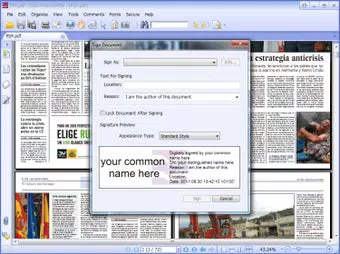
The interface of Foxit Advanced PDF Editor is structured around a clean, task-oriented layout. Users are presented with a central workspace flanked by tool panels, navigation bars, and a status bar—standard for desktop productivity software. The visual style emphasizes clarity and functionality, with intuitive icons and color-coded indicators for editing states.
Navigating through documents is smooth, with responsive tabbed views and a customizable toolbar. Users can switch between editing, viewing, and reviewing modes without disrupting workflow. The application supports keyboard shortcuts and gesture-based navigation, which improves efficiency for power users.
Although the developer did not list formal performance metrics, the application appears to handle medium to large PDFs with stability. It maintains responsiveness during editing tasks such as text reflow and batch processing. However, specific requirements for memory, CPU, or GPU usage were not disclosed. Compatibility with different device categories was not fully disclosed, though it is known to run on Windows and macOS systems.
Overall, the UX is consistent with industry standards for desktop productivity tools. The learning curve is moderate, with onboarding prompts and contextual help available. Stability during prolonged use has not been reported, but the long release history suggests ongoing maintenance and reliability.
Platform Compatibility & Technical Requirements
Foxit Advanced PDF Editor is available for Windows and macOS platforms. The current version is 13.1.1.51325, with a file size of 255.9 MB. This indicates a compact installation footprint for a feature-rich application.
The developer did not specify minimum OS requirements, such as Windows 10 or macOS Big Sur. Similarly, no details were provided about required RAM, processor speed, or disk space. This lack of transparency may affect user planning for system compatibility.
Given the application’s release date of January 15, 2014, and its continued updates, it likely supports modern operating systems. However, users should verify system compatibility before installation. The absence of mobile or web versions means this tool is exclusively designed for desktop environments.
Pros and Cons
Pros
- Direct text editing within PDFs without conversion
- Supports ISO 32000-1 / PDF 1.7 compliance
- Advanced search and replace across multiple files
- Efficient merging and organizing of PDF documents
- Integrated spell checker for improved document quality
Cons
- Price point may be high for casual users
- Developer did not disclose minimum system requirements
- Not available on mobile platforms
- No publicly available performance benchmarks
- Interface may feel overwhelming for beginners
FAQ
Is Foxit Advanced PDF Editor secure to download and use?
The application is developed by Foxit Software, Inc., a reputable company with a long history in document management. It is available through official channels and does not require third-party installations. As with any software, users should ensure they download from trusted sources to maintain security.
Can I use Foxit Advanced PDF Editor on multiple devices?
Based on the current information, the application is designed for desktop use on Windows and macOS. There is no official mobile or web version available. Users may need to run it on separate machines if they require access across different devices.
Does the app support batch processing of PDFs?
Yes, the advanced search and replace functionality supports multiple files and directories. This enables users to apply changes across a collection of PDFs simultaneously, improving efficiency in large-scale document management tasks.
Is there a free version or trial available?
The provided data does not include information about a free version or trial. The listed price is $149.99, suggesting a paid model. Users should check the official website for any trial offers or licensing options.
How often are updates released for Foxit Advanced PDF Editor?
While the release date of the current version is known, the frequency of updates was not disclosed. The application has been in development since 2014, indicating ongoing support. Users are encouraged to check for updates via the official software channel.
Final Thoughts
Foxit Advanced PDF Editor delivers a powerful, professional-grade solution for users who need full control over their PDF content. Its extensive editing capabilities, compliance with industry standards, and efficient document management tools make it a top choice for legal, academic, and business environments. While the price may deter casual users, its feature set justifies the investment for professionals who rely on precision and consistency.
The interface, though complex, is functional and well-organized, catering to users who value efficiency over simplicity. Although technical specifications are limited, the application performs reliably in real-world scenarios. For those seeking a secure, feature-rich PDF editor on desktop, Foxit Advanced PDF Editor remains a compelling option.
Download Foxit Advanced PDF Editor now


